Apple Watch · iPhone · iPad
LockinMinder
Your lock combinations on your wrist, and a map to every padlock you left behind.
The combination lock app for your gym locker, bike lock and suitcase. Check a combination at the lock, tap Mark as Locked, and find your way back to it later on a map. Now on the App Store.
Free download with up to three locks. Pro is a one-time purchase, not a subscription.
Launch offer: LockinMinder Pro, free
The first 500 people get Pro for free with a one-time App Store code, while codes last.
What it does
Combinations on your wrist
Open a lock on Apple Watch and its combination appears in large numbers, one tile per wheel. No phone, no notes app.
Every kind of combination lock
Each lock has a name and a combination of 3, 4 or 5 numbers from 0 to 99, so wheel locks and dial padlocks both fit.
Remembers where you locked it
Mark as Locked saves the time and where you are. The lock's screen shows a map with a pin, and the iPhone app offers walking directions in Apple Maps.
On your Lock Screen
While a lock is locked, a Live Activity on the Lock Screen, in the Dynamic Island and in the Apple Watch Smart Stack shows how long it's been. Never the combination.
In sync through your iCloud
Add, edit or delete a lock on any of your devices. Changes sync through your own iCloud account, and Sync Now checks on demand.
Speaks your language
LockinMinder is in English, Spanish, French and Traditional Chinese.
How it works
Add a lock
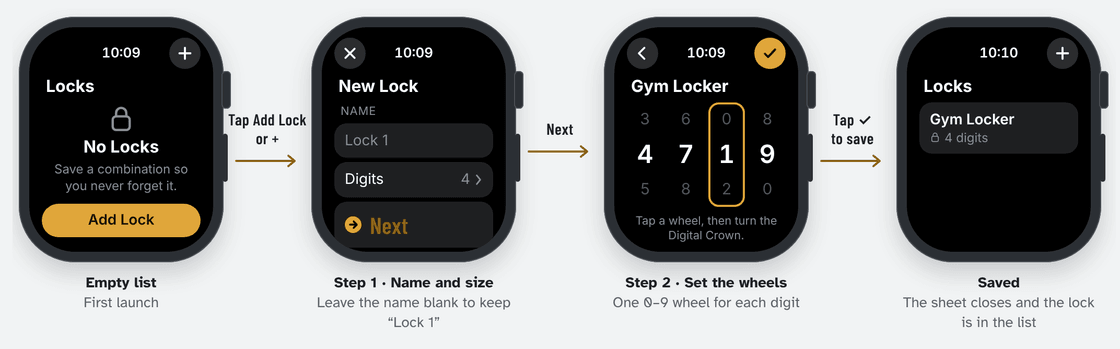
On Apple Watch, adding a lock takes two steps so the wheels get a whole screen: a name and how many numbers, then one 0–99 wheel per number, like the dials on the real lock. Tap a wheel and turn the Digital Crown to set it. Leave the name blank and it becomes "Lock 1", "Lock 2" and so on. On iPhone and iPad, it's a single form.
Check a combination at the lock
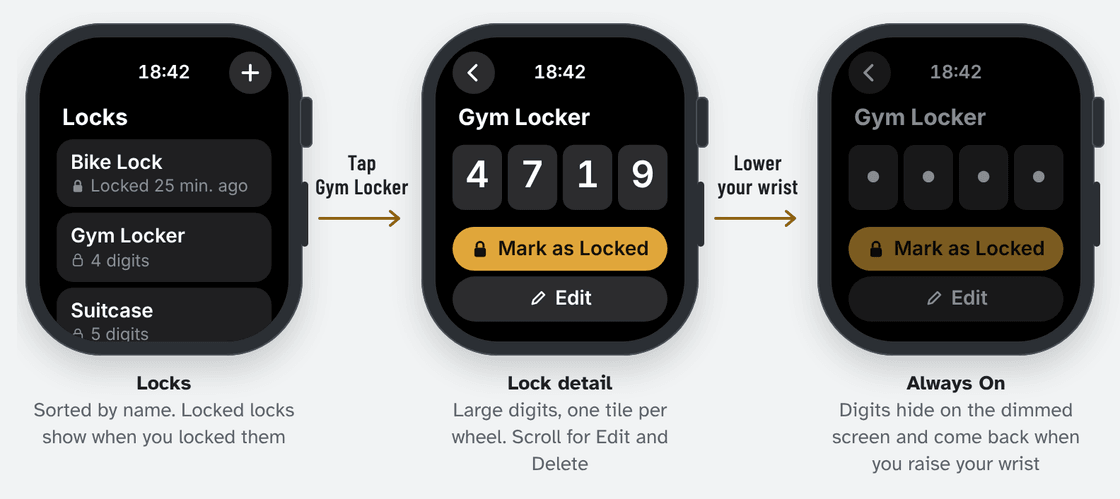
The list shows only names and whether each lock is locked, so nobody nearby can read a combination from it. The digits appear when you open a lock, and turn into dots as soon as you lower your wrist.
Find your padlock again
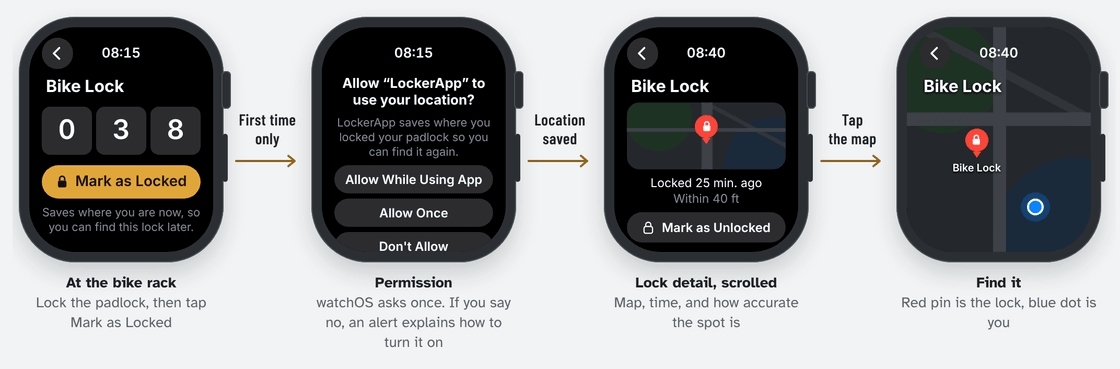
After snapping the padlock shut, tap Mark as Locked. Your device takes one location fix and saves it with the time. Later, the lock's screen shows where it is and how accurate the spot is ("Within 40 ft"), and the map shows the lock and you together. If location is off, the lock is still marked as locked, with the time.
Private by design
- The app locks itself. iPhone and iPad open with Face ID, Touch ID or a 6-digit app passcode. Apple Watch opens only while it's unlocked on your wrist.
- Combinations stay out of sight. A combination is shown only on its lock's own screen, never in the list, and it is hidden on the dimmed Always On display and in the iPhone app switcher.
- Your data is yours. Locks are kept in your private iCloud database, with the name, combination and location end-to-end encrypted. LockinMinder has no server of its own.
- No tracking. A location is saved only when you tap Mark as Locked. With Pro, the iPhone follows your location only while a lock's Live Activity is showing, to update the distance back to it.

Free and Pro
Up to three locks are free. Pro is a one-time purchase, not a subscription, and it unlocks on every device signed in to the same Apple Account.
| Free | Pro | |
|---|---|---|
| Saved locks | Up to 3 | Unlimited |
| Combinations, map and walking directions | Yes | Yes |
| iCloud sync between Apple Watch, iPhone and iPad | Yes | Yes |
| Live Activity | Name and how long it's locked | Adds live distance and direction |
With Pro, the Live Activity shows the distance and a compass arrow back to the lock, updated while you walk. iCloud sync stays free, and locks you've already saved are never hidden or deleted.
Questions and answers
Is LockinMinder free?
Yes. LockinMinder is free to download and keeps up to three locks, with their combinations, the map and walking directions, and iCloud sync. Pro is a one-time purchase, not a subscription. It unlocks unlimited locks and the live distance and direction back to your lock, on every device signed in to the same Apple Account.
How do I get Pro free with the launch offer?
Open altawoz.com/lockinminder/redeem on your iPhone and tap Get my free code. The App Store opens with a one-time code filled in, installs LockinMinder and unlocks Pro. There is one code per person while the 500 launch codes last.
Which devices does LockinMinder work on?
iPhone and iPad with iOS 18 or iPadOS 18 or later, and Apple Watch with watchOS 27. Your locks sync between them through your own iCloud account.
Can people nearby see my combinations?
No. The list shows only the names of your locks. A combination appears when you open its lock, turns into dots as soon as you lower your wrist, and is hidden on the dimmed Always On display and in the iPhone app switcher. On iPhone and iPad the app opens with Face ID, Touch ID or a 6-digit app passcode; on Apple Watch, only while the watch is unlocked on your wrist.
Where are my combinations stored?
In your private iCloud database, with the name, combination and location of each lock end-to-end encrypted. LockinMinder has no server of its own.
Does LockinMinder track my location?
No. A location is saved only when you tap Mark as Locked, and the app works with location off. With Pro, the iPhone follows your location only while a lock's Live Activity is showing, to update the distance back to it.
What kinds of locks can I save?
Any lock with a combination of 3, 4 or 5 numbers from 0 to 99, so wheel locks on bikes and suitcases fit as well as dial padlocks on gym and school lockers.
Which languages does it speak?
English, Spanish, French and Traditional Chinese.
Get LockinMinder
Free on the App Store for iPhone and iPad with iOS 18 or later, and Apple Watch with watchOS 27. During the launch, the first 500 people get Pro free.
Curious how it's built? Read the project page or the launch announcement.